Contents
- Why the extraction method matters
- Data layers in a phone
- Encryption: the key lives in the processor
- BFU and AFU: why time matters
- Three extraction methods
- Comparing the methods
- How we choose a method
- What about deleted data?
- For those commissioning an examination
- Integrity and documentation
- Frequently asked questions
In brief
- Logical extraction collects the data the system chooses to expose. It is quick and safe, but it covers neither most deleted data nor full application data.
- FFS (Full File System) is today's standard for new phones. It yields the complete file system, including messenger databases, stored passwords and activity logs.
- Physical extraction — a bit-for-bit copy of memory — is effectively not used on modern iPhones and flagship Androids. The data is encrypted with a key that never leaves the processor. Some phones with vulnerable chipsets are the exception.
- The outcome of an examination is often decided in the first hours after seizure: the state of the phone (BFU or AFU) and whether the unlock code is known.
Why the extraction method matters
The same phone can yield a few hundred records or a few hundred thousand. The difference comes from the extraction method, not from skill in operating the software. The method decides whether the material will contain messenger conversations, location history, stored passwords and traces of deleted content.
For the authority commissioning an examination, knowing the methods has practical consequences. It allows precise questions to be put to the expert, a realistic assessment of how long the work will take, and a correct reading of the conclusions. For a private individual it makes clear what can be expected before the phone reaches the laboratory.
A note on terminology
Tool vendors do not use these names consistently. In marketing material, a full file system extraction is sometimes called "physical" or "full". In FireNet laboratory opinions we always describe the method actually applied, the tool and its version, so that the scope of the examination is unambiguous for the court.
Data layers in a phone
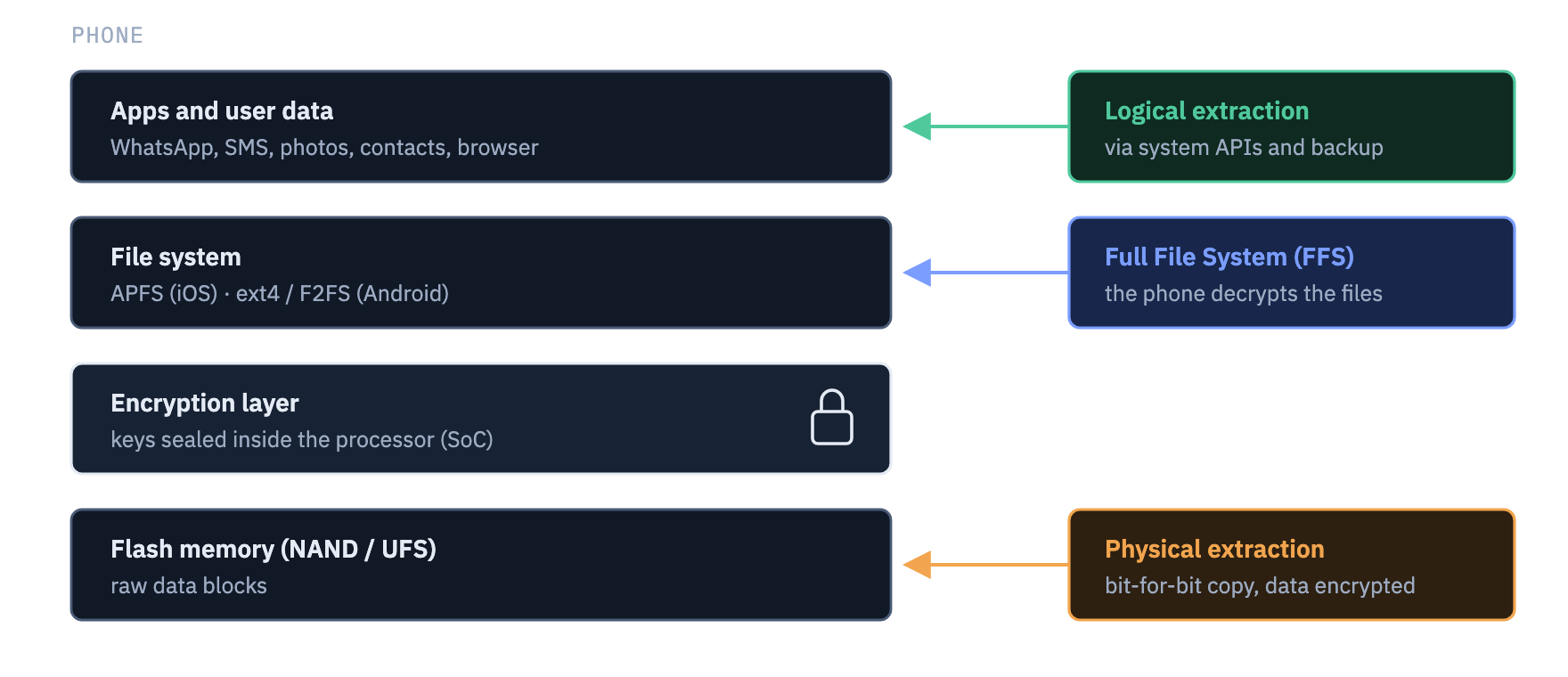
From a digital forensics point of view a phone consists of several layers. At the top are applications and user data. Below them the file system, which organises data into directories and files. Lower still the encryption layer, and at the very bottom the physical flash memory chips. Each extraction method reaches a different layer.
Encryption: the key lives in the processor
All contemporary iPhones and Android phones encrypt user data by default. On iOS this is handled by the Data Protection mechanism and the dedicated Secure Enclave. On Android it is file-based encryption (FBE) supported by a TEE and, in newer models, a separate security chip (for example Titan M2 in Pixel phones, Knox Vault in Samsung phones).
Encryption keys are derived from two components: the unlock code entered by the user and a unique hardware key burned into the processor. The hardware key cannot be read from outside. The same circuit also limits the number and rate of attempts to guess the code.
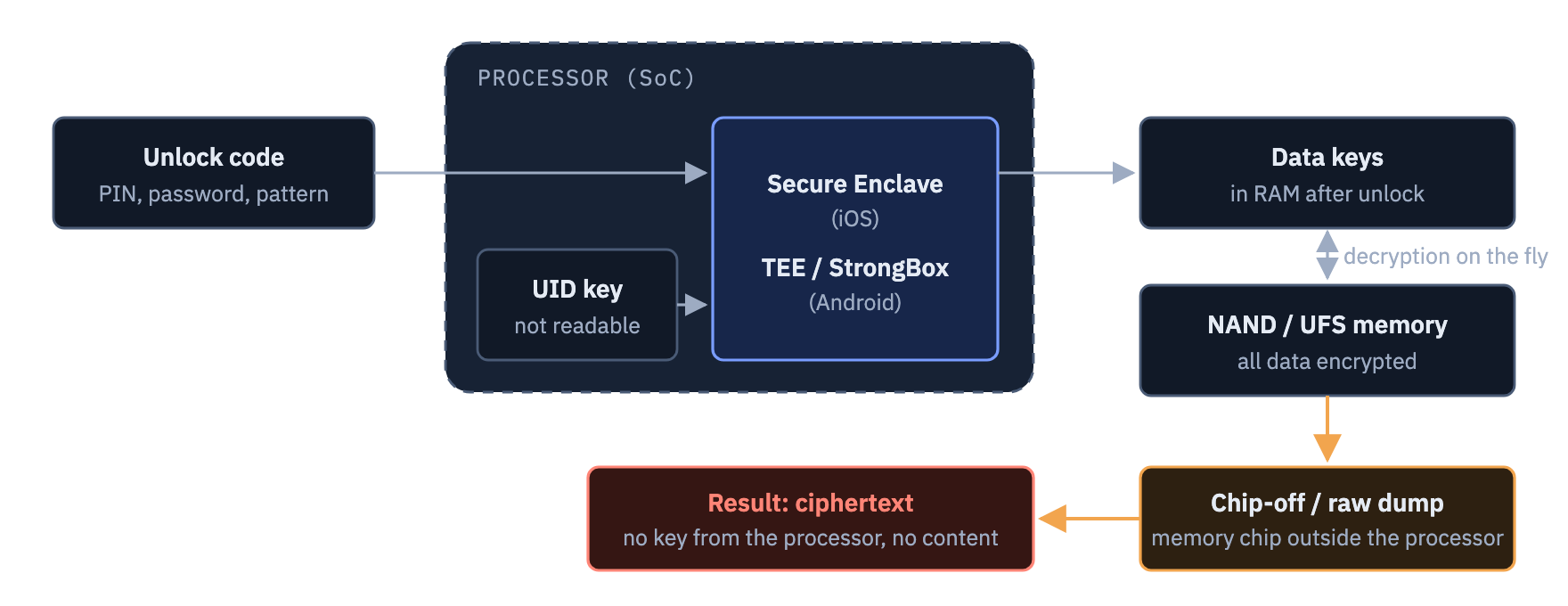
The conclusion is simple. On a modern phone, physical access to the memory is not enough. The content is available only when that particular processor decrypts it. Effective methods therefore work "from the inside", with the system running on the examined phone.
BFU and AFU: why time matters
After being switched on or restarted, a phone is in the BFU state (Before First Unlock). The keys to most data do not yet exist, because they are formed only once the code has been entered. After the first unlock the phone moves into the AFU state (After First Unlock). The keys remain in memory even when the screen is locked again. Considerably more data can usually be obtained from a phone in the AFU state.
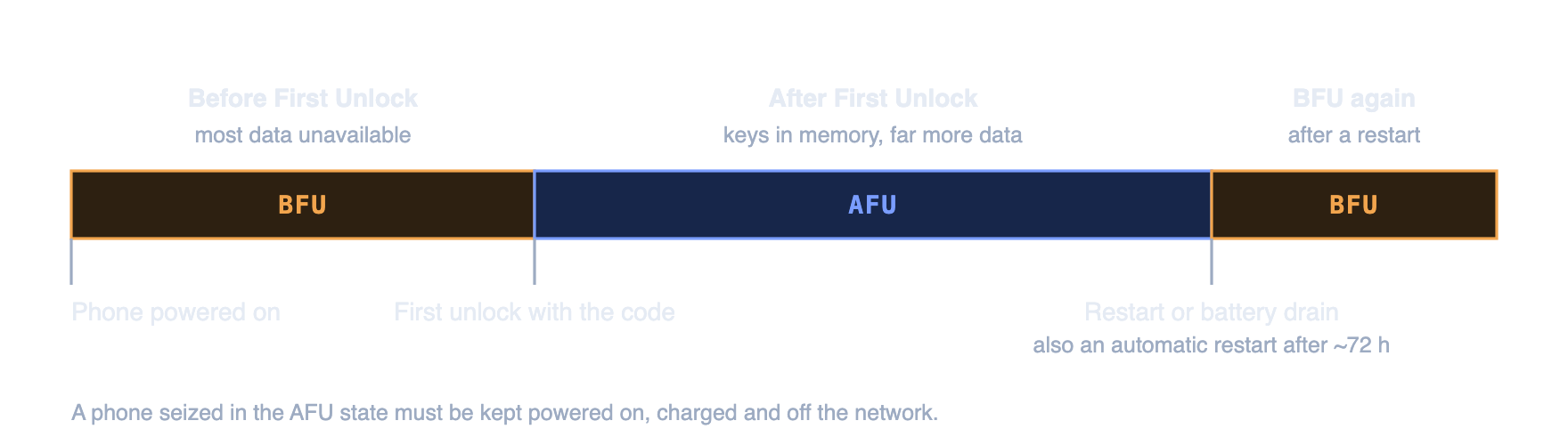
Manufacturers deliberately shorten the time a phone stays in the AFU state. Since iOS 18.1, an iPhone that has not been unlocked for about 72 hours restarts itself and returns to BFU. Since 2025 a similar mechanism has been reaching Android phones. In addition, an hour after being locked an iPhone restricts communication with accessories over the USB port, which hinders some methods.
Securing a phone: what to do
- Leave a phone that is switched on switched on. Leave one that is switched off switched off.
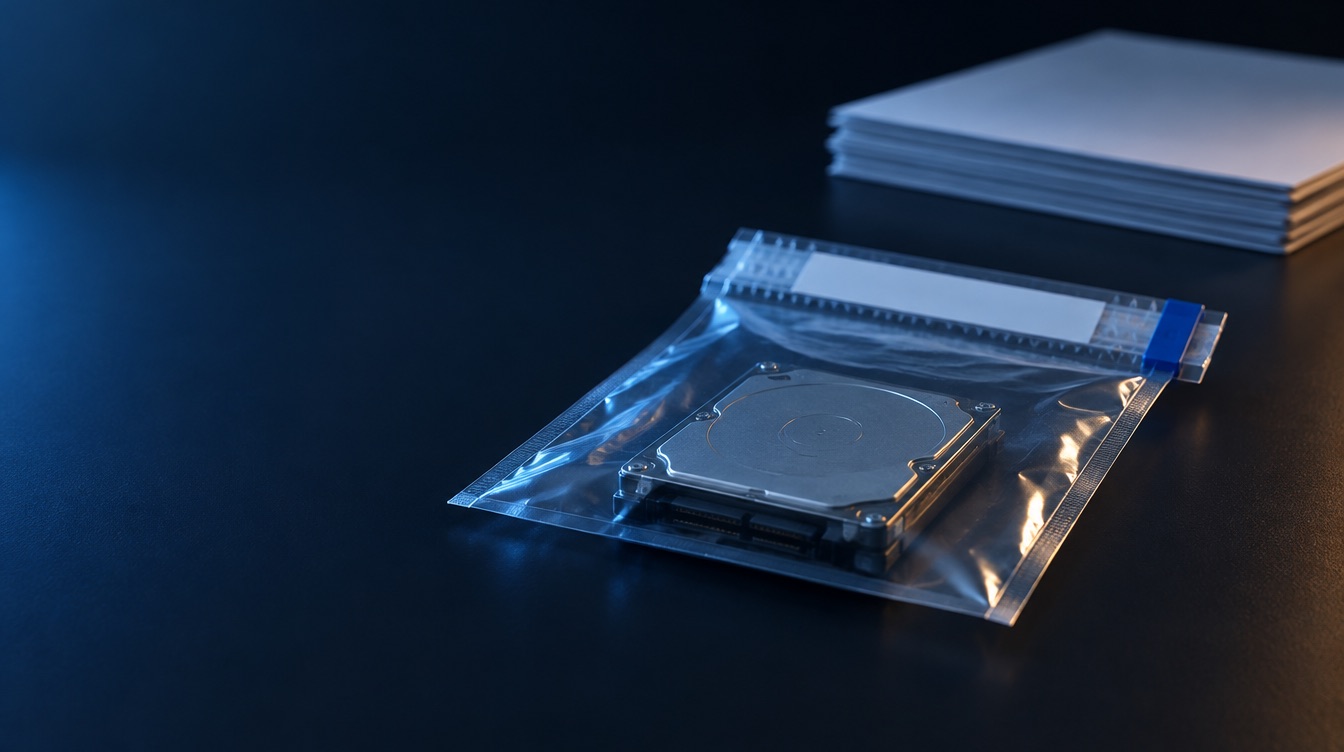
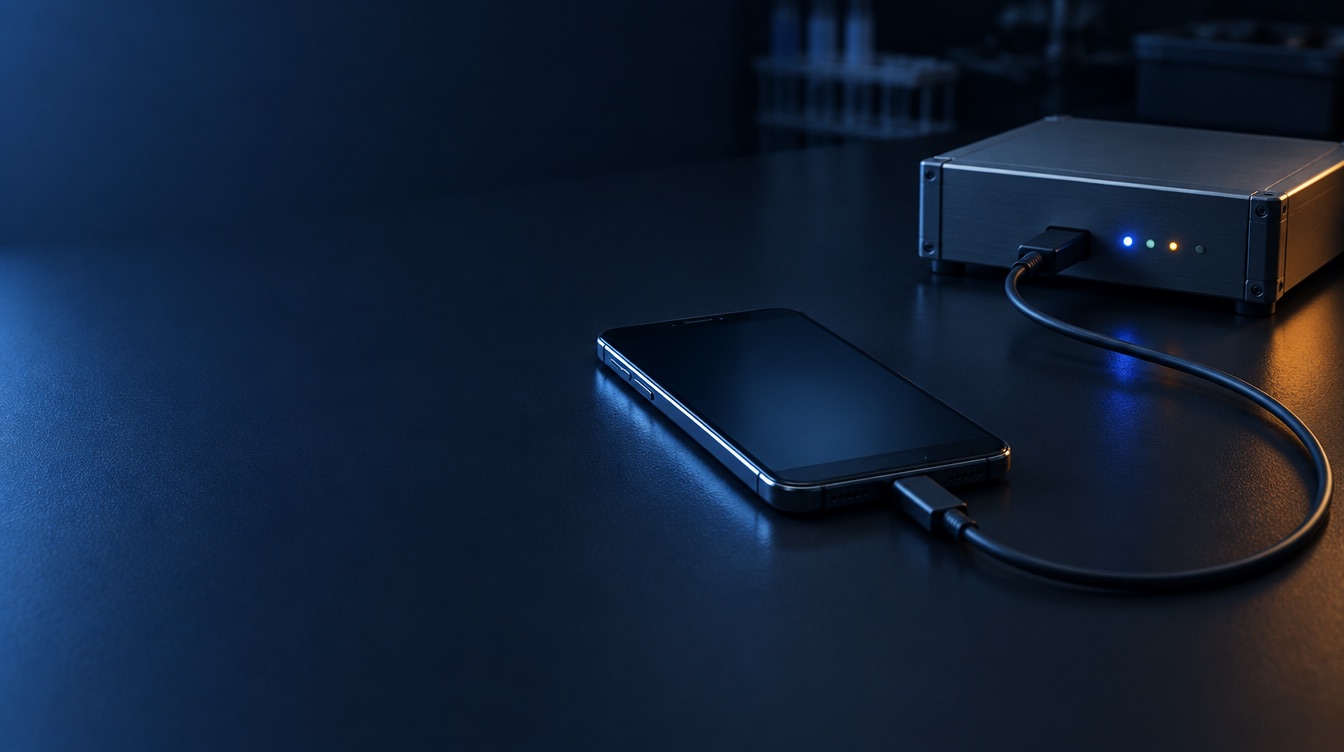
- Cut it off from the network: place it in a Faraday bag together with a connected power bank.
- Photograph the screen and note the time of seizure and the state (locked, unlocked).
- If the phone is unlocked and you have no Faraday bag, enable airplane mode and record this in the report.
- Deliver the phone to the laboratory as soon as possible. For an iPhone, preferably within 72 hours of the last unlock.
What to avoid
- Do not restart the phone and do not let the battery run flat.
- Do not try to guess the code. Failed attempts extend the lockout and, if the relevant option is enabled, may lead to the data being wiped.
- Do not browse the phone's contents. Every action leaves traces and changes data.
- Do not leave the phone connected to a network. Remote wiping is possible.
Three extraction methods
Below we describe each method in the same way: what it involves, how we perform it, what it yields, what its limitations are and what it means for the newest phones.
Logical extraction
Available almost always
What it involves
The tool uses official system interfaces and backup mechanisms. It is the system that decides which data it will expose.
How we perform it
- iOS: a backup in the iTunes/Finder-compatible format, always with a backup encryption password. An encrypted backup covers more data, including some stored passwords and Health app data. We additionally collect media.
- Android: the ADB interface, an agent temporarily installed by the forensic tool, manufacturer backup mechanisms.
What it yields
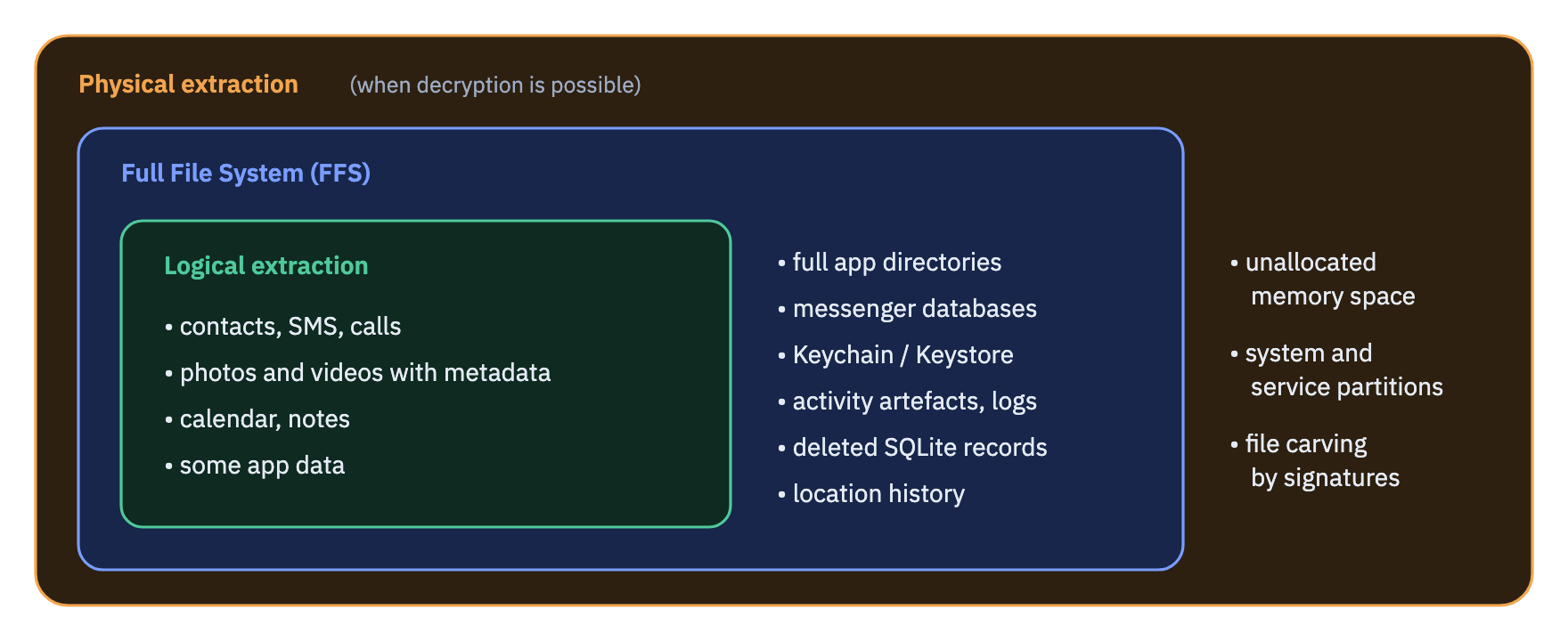
Contacts, call logs, SMS, MMS and iMessage, photos and videos with metadata (date, camera model, GPS coordinates), calendar, notes, some application data.
Limitations
No access to most deleted data. Many messengers exclude their data from backups. No system logs and no most activity artefacts. On Android the scope depends heavily on the manufacturer and the system version.
Requirements
An unlocked phone or a known code, plus trust confirmation for the computer (iOS) or consent to USB debugging (Android).
Full File System (FFS)
The standard for new phones
What it involves
The tool runs code with elevated privileges on the phone, using a system vulnerability or a dedicated agent. The code runs inside the system, so the phone itself decrypts the files. The tool copies the complete directory tree.
How we perform it
Using specialist forensic tools (among others Cellebrite, Magnet Graykey, MSAB XRY, Oxygen Forensic). Availability depends on the model, the system version and the security patch level. On iPhones with an A11 processor and older, the unpatchable checkm8 vulnerability is used.
What it yields
Everything that logical extraction yields, and in addition:
- full application directories, including the WhatsApp, Signal, Telegram and Messenger databases;
- the keychain (iOS Keychain, Android Keystore): passwords, tokens, application keys;
- activity artefacts: on iOS among others Biome, KnowledgeC and Screen Time, on Android among others Digital Wellbeing;
- location history stored on the device and system logs;
- some deleted records from application databases.
Limitations
Support for the newest system versions appears with a delay. In the BFU state only part of the data is available. The method does not cover unallocated memory space.
Requirements
Support for the given model and system version by the tool. Best results in the AFU state or with a known code.
Physical extraction
Exceptional on new phones
What it involves
A bit-for-bit copy of the entire memory, including areas the system does not treat as files.
How we perform it
In software, through service modes and vulnerabilities in the processor's boot code (for example MediaTek BROM, or Qualcomm EDL on older chips). In hardware, through service connectors (JTAG, ISP) or by desoldering the memory chip (chip-off).
What it yields
If decryption is possible: a full memory image including unallocated space, and the ability to recover files by signature (carving).
Limitations
On modern phones the image is encrypted and the keys never leave the processor. Flash memory clears deleted blocks quickly (the TRIM mechanism), so even a decrypted image usually yields little beyond FFS. Chip-off is irreversible.
When it applies today
Some phones with vulnerable chipsets, including a number of new budget models with MediaTek or Unisoc chips. The tool then produces a dump and decrypts it at the same time. Beyond that: older devices, damaged devices, feature phones and memory cards.
The chipset decides, not the release date
A new phone does not always have modern protection. A cheap model released this year may be susceptible to physical extraction, while a flagship a few years old may not. Before an examination we check the exact model, the processor and the security patch level.
Comparing the methods
The ranges of data overlap. FFS covers everything that logical extraction covers, and physical extraction, where it can be decrypted, covers everything that FFS covers.
| Feature | Logical | FFS | Physical |
|---|---|---|---|
| Level of access | System interfaces, backup | File system from the inside | Raw memory |
| Who decrypts the data | The phone's system | The phone's system | Keys from the processor required |
| Application data | Partly | Full | Full |
| Passwords and tokens | Partly (encrypted iOS backup) | Yes | Yes |
| Deleted data | Practically no | Partly (SQLite databases) | Partly (SQLite and free space) |
| Newest iPhone | Yes | Yes, subject to tool support | No |
| Flagship Android | Yes | Yes, subject to vulnerability | No |
| Android with a vulnerable chipset | Yes | Yes | Often |
| Interference with the device | Minimal | Slight, documented | From slight to irreversible (chip-off) |
How we choose a method
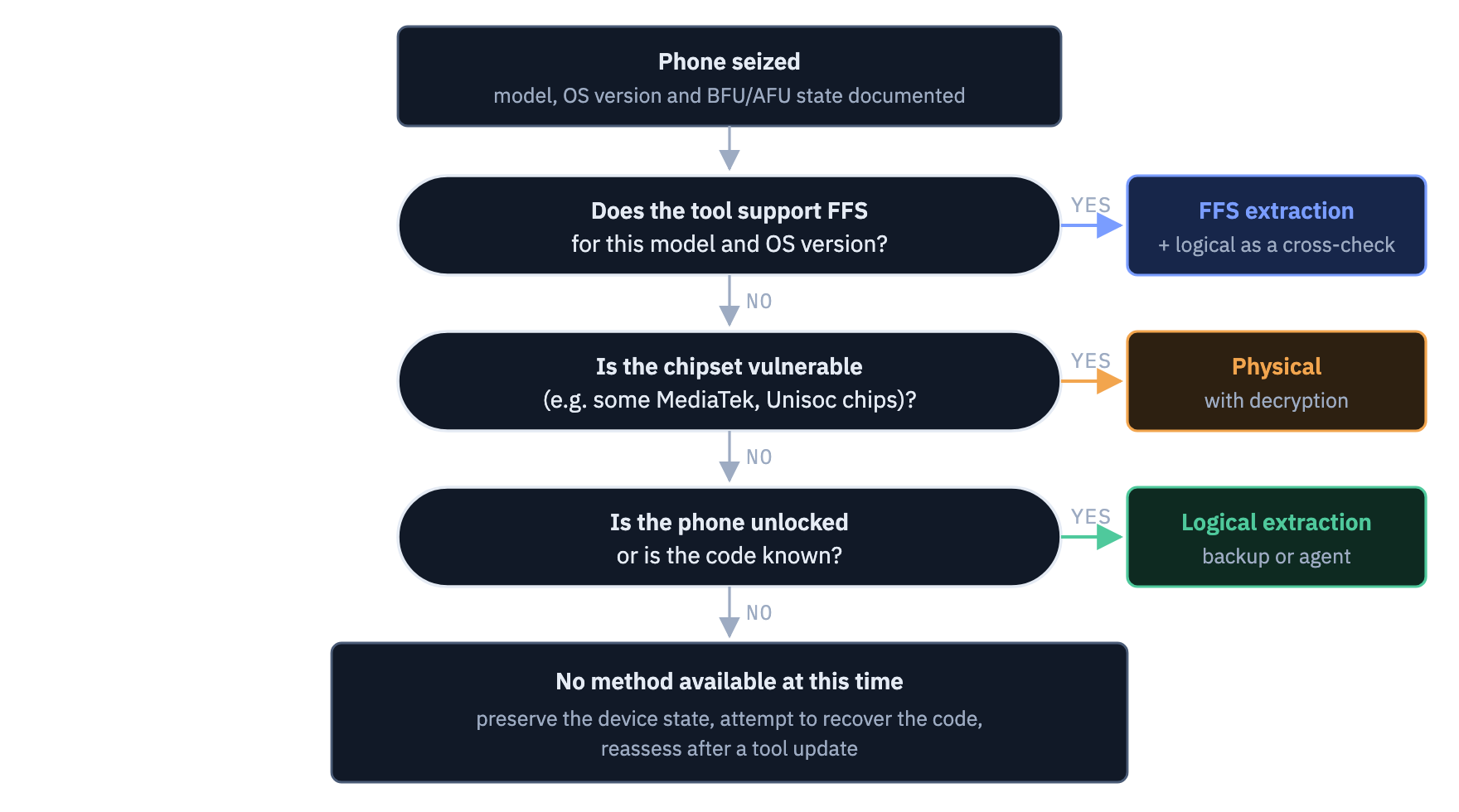
At the FireNet laboratory we start with the method that will yield the most data with the least interference with the device. The diagram below shows a simplified decision path. In practice we often combine methods: after an FFS extraction we additionally perform a logical one in order to compare the results.
What about deleted data?
This is one of the most frequent questions. The answer depends on the method and on how the application stores its data. Most applications, including SMS on iOS and Android as well as messengers, keep messages in SQLite databases. Deleting a message in the application usually does not remove it from the database file immediately. The record is merely marked as deleted, and its content may remain in the free pages of the database or in the -wal journal file.
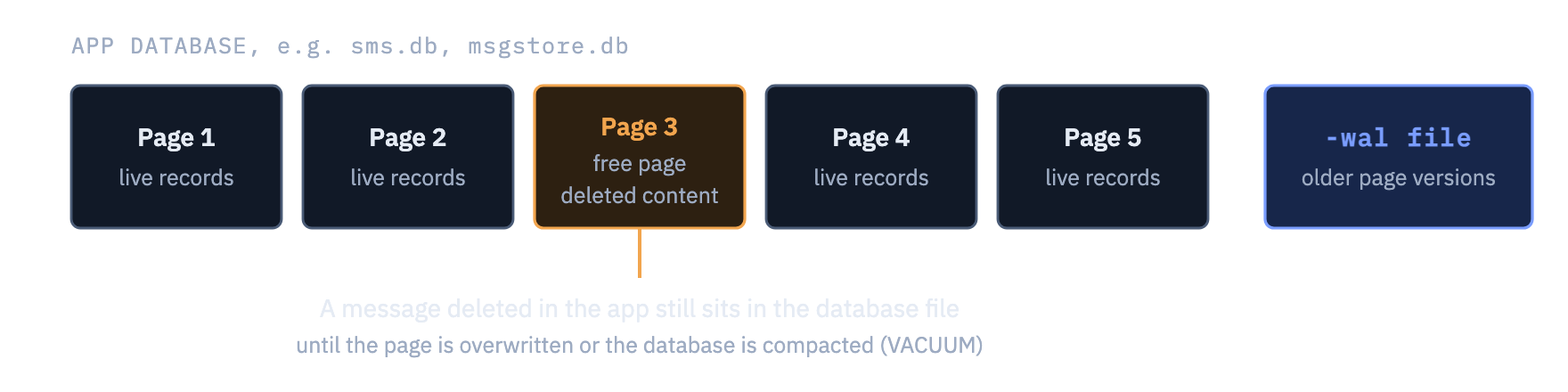
- Logical extraction practically gives no access to such traces, because it usually does not cover complete database files.
- FFS contains complete database and journal files, which is why it is most often the method that allows deleted messages to be recovered.
- Physical extraction adds unallocated memory space. On new phones the TRIM mechanism clears it quickly, so the gain is usually small.
The chance of recovery decreases with time and with how intensively the phone is used. It cannot be guaranteed in advance. A reliable assessment can be given only once the extraction has been performed.
For those commissioning an examination
A well-prepared instruction shortens the examination and increases its evidential value. Below is a list of information worth passing on together with the phone, and examples of questions for the expert.
What to provide with the phone
- Make, model and casing colour, the IMEI number if known.
- The state of the phone at the moment of seizure: switched on or off, locked or unlocked, with the time.
- The code, password or unlock pattern, if these have been established.
- Information about SIM cards and memory cards.
- The period the case concerns, and the applications that are relevant.
- The charger or cable, if these were seized together with the phone.
Example questions for the expert
- Is it possible to make a copy of the data from the phone of make … model … (IMEI …), and if so, by what method and to what extent?
- What messages (SMS, iMessage, WhatsApp, Signal, Messenger) were exchanged with the number or contact … in the period from … to …?
- Are there traces of deleted data on the phone, and is their recovery possible?
- What device locations were recorded on …?
- Was the phone unlocked and used within the time range …?
Precise questions give precise answers
The question "please secure all data" leads to a report running to thousands of pages. Indicating the period, the people and the applications allows the analysis to concentrate on what matters for the case.
Integrity and documentation
The evidential value of an extraction depends on whether it can be demonstrated that the material has not been altered and that it is known how it came about. We work in accordance with the principles of ISO/IEC 27037 on the identification, collection and acquisition of digital evidence.
- Checksums. For every extraction result we compute a SHA-256 digest. It allows confirmation at any time that the material is identical to the one acquired.
- Full documentation. The report covers the state of the device on receipt, the successive actions with times, the tools used and their versions, and photographs.
- Verification of results. Key findings are checked with a second tool or manually in the raw data, for example directly in the database file.
- Disclosed interference. Every method of extracting a phone introduces minor changes to the device, for example the installation of a temporary agent. This is standard and accepted practice, provided it is described. In our opinion we always state what changes were necessary.
- Chain of custody. We document every transfer of the device and of the media holding the material.
Frequently asked questions
Can a phone be extracted without knowing the code?
Sometimes yes. It depends on the model, the system version and the state in which the phone was seized. Some tools can obtain part of the data in the BFU state or attempt to establish the code. With the newest models running an up-to-date system, knowing the code very often decides whether the examination is possible at all.
Will you recover deleted WhatsApp messages?
This is possible if an FFS extraction can be performed and the deleted records have not yet been overwritten in the database. It cannot be guaranteed before the examination. The chances decrease with time and with how intensively the phone is used.
Will the phone be damaged?
Logical and FFS extraction do not damage the phone. Hardware methods such as desoldering the memory are irreversible, but on modern phones they are practically never used. If we are considering a method that may permanently alter the device, we inform the commissioning party before carrying it out.
Why does examining a new iPhone take longer than an old Android?
Newer models have stronger protection, and tool support for the newest system versions appears with a delay. The time is also affected by memory capacity and the scope of the analysis. The extraction itself usually takes from a few to a dozen or so hours, and the analysis from a few days upwards, depending on the questions.
Can a private individual commission an examination of a phone?
Yes, if the phone belongs to them or they have the consent of the owner or of the data controller. Examining someone else's device without a legal basis may infringe data protection rules and the confidentiality of correspondence. Where there is any doubt, we clarify the basis before accepting the instruction.
Does switching the phone off before handing it to the laboratory change anything?
Yes, significantly. Switching off or restarting restores the BFU state, in which most data remains encrypted until the code is entered. If the phone is switched on, it should be left switched on, powered and cut off from the network.
Need a phone examined?
The FireNet laboratory performs extractions and analyses of iOS and Android phones for law enforcement, courts, companies and private individuals. Before accepting a device we advise on how to secure it and assess which extraction method is possible.
Note. This article describes the state of knowledge as of October 2026. The capabilities of tools change with system updates, which is why we always assess the availability of a particular method for a given model individually.